Operator identity
Existing Azure identity is used for collection on the operator workstation.
Security
Azure Network Workbench analyses architecture without becoming another custodian of your Azure credentials.
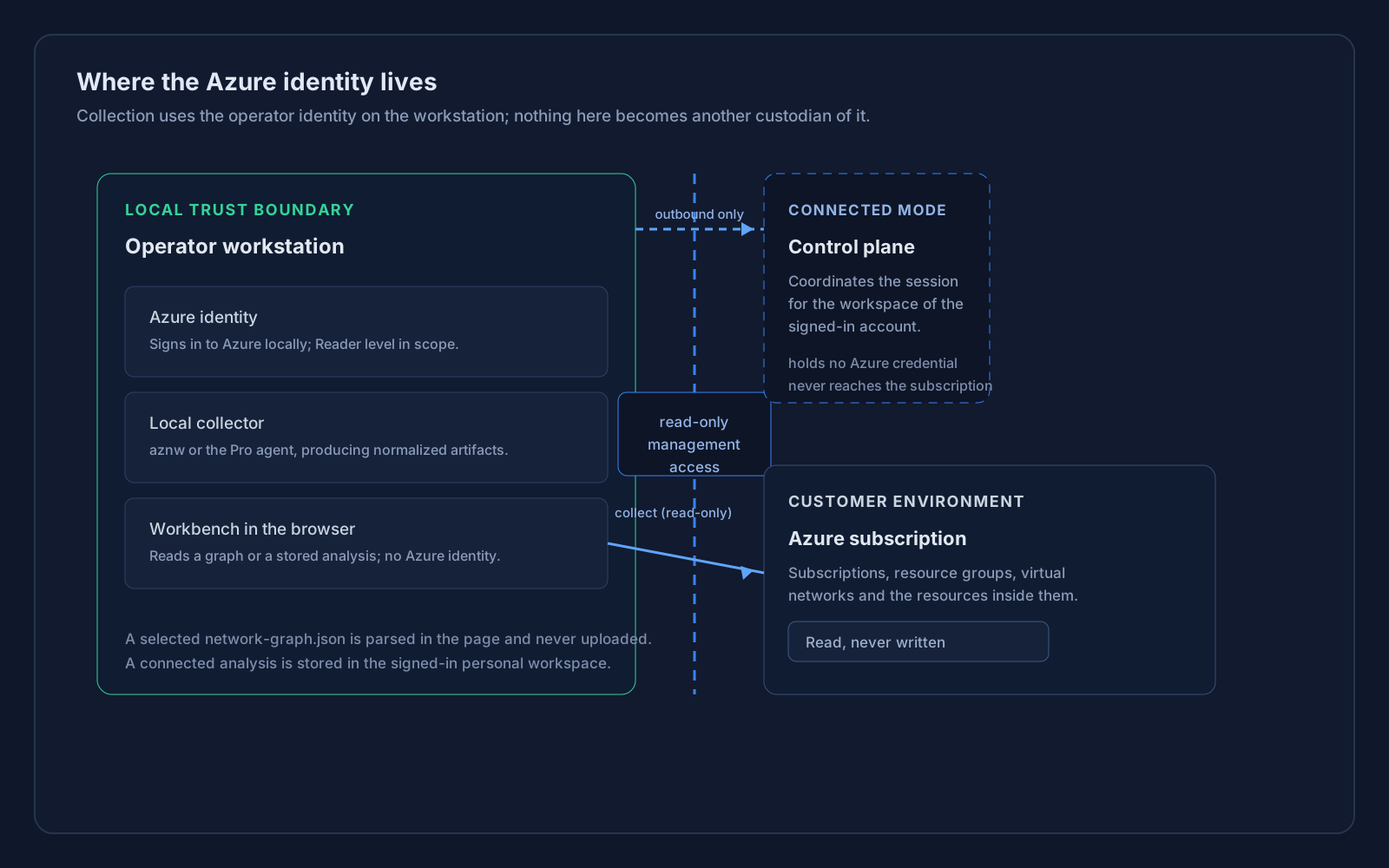
The local trust boundary: the workstation holds the Azure identity, and only read-only management access crosses to Azure.
Existing Azure identity is used for collection on the operator workstation.
Reader-level access is the baseline for architecture collection workflows.
Credentials stay local. A graph you select is analysed in the browser session, and a connected analysis is stored in your signed-in workspace.
Local collector actions run on the workstation and use read-only Azure management access. No Azure credentials are stored by this web application. A connected Pro agent opens that connection outward from the workstation, and the control plane that coordinates the session relays commands and receives analysis artifacts, holding no Azure credential of its own.
Azure Network Workbench and local collector run here. Credentials remain local.
Subscription resources are read with outbound, read-only management access.
Credentials stay on the workstation. Only read-only management access crosses the boundary.
Azure access uses the identity of the operator running collection on their own machine. No product service impersonates that identity.
Collection is designed around read-only access to the resources in scope, so analysis never requires write access to a subscription.
Reading network configuration requires Reader-level permissions on the resources in scope. Wider permission is not required to analyse an architecture.
The web application never asks for, stores, or transmits Azure credentials. There is no credential custody model to trust.
A connected Pro agent opens its connection outward from your machine, so nothing on it has to be reachable from the internet. The service it connects to relays named commands and receives the artifacts the agent produces: it holds no Azure credential and never reaches your subscription. The browser talks only to that service, never to your machine, and the identity the agent stores is scoped to one workspace and can be revoked.
A network-graph.json you select is read with the browser File API and parsed in the page. It is not uploaded, and the analysis it produces lives only in the browser session.
A network graph describes your environment: subscriptions, resource names, regions, and relationships, so treat it as sensitive. A file you select is shared only if you choose to share it. An analysis a connected Pro agent produces is transferred to the service coordinating the session and stored durably in your signed-in workspace, where you can reopen or delete it.
The hosted service requires a sign-in, and every operation and artifact is resolved against the workspace of the signed-in account. That workspace is personal: it is created for the account the first time it signs in, and a host can only be paired into the workspace of the person who pairs it, so one account cannot reach another account’s analysis.
A connected collection writes its artifacts and its analysis record to durable storage, keyed by workspace and analysis. An analysis therefore survives a restart or a scale-in, can be reopened by its address, and carries the Pro evidence - routing, security, reachability, and trace results - that the Workbench reads back.
A stored analysis can be deleted from the workspace. Deletion removes the artifact bytes and then the record, so a failure part-way leaves an analysis that reads as absent rather than bytes nothing accounts for, and a second delete is a not-found rather than a silent success. Revoking a paired host is durable in the same way.
A retention window and deleting a whole workspace are not implemented. The personal workspace identifier is derived from the signed-in account and would be recreated at the next sign-in, so a cascade has no lasting meaning until accounts themselves are deletable. Revoked credential records are kept on purpose: revocation is a write rather than a delete, and the record is the only evidence that a credential was issued and later revoked.
What is not built: a retention policy, organisation workspaces, sharing, operation history, and collaboration. Everything you collect stays in your own workspace until you delete that analysis.